Koozai > Blog > Using Google Webmaster Tools To Reclaim Organic Keywords & Rankings

Using Google Webmaster Tools To Reclaim Organic Keywords & Rankings

| 5 minutes to read

Analytics Magnifying Glass - Get Organic Keyword Data from Google Webmaster ToolsGoogle Webmaster Tools is an essential resource for webmasters with a wealth of useful information for optimising websites and identifying issues. What’s more, the tool kit was recently revamped with a new navigation structure, additional features and enhanced reports.

One such report to receive development was the Search Queries Report, located under the new Search Traffic sub-menu. What was once a very basic, approximately and fairly useless report is now the very opposite and provides information you cannot currently find anywhere else.

Where To Find The Search Queries Report In Google Webmaster Tools

For those of you who haven’t used this report in quite some time, you can get to the Search Queries report in one of two ways.

  1. From the Site Dashboard click the “Search Queries” bar
  2. Navigate directly to the report which is listed under the “Search Traffic” menu on the left.

When you get there, you will see a chart and table similar to this:
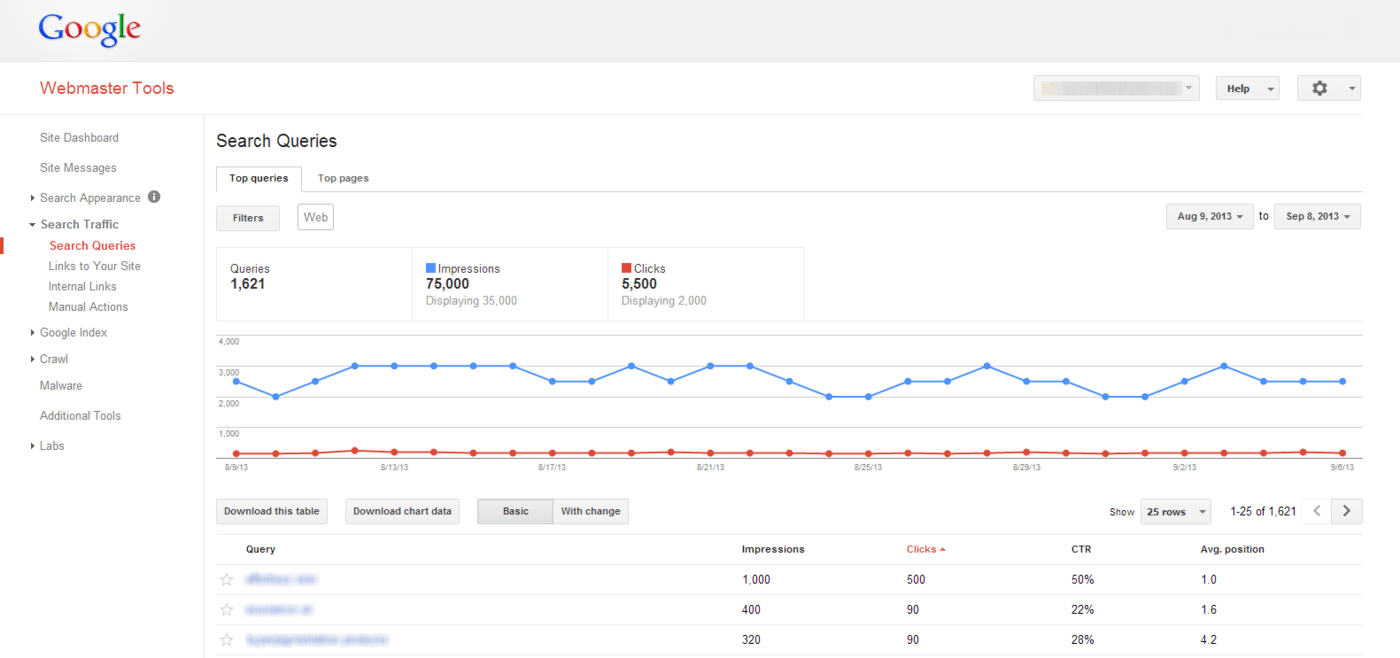
Search Query Report in Google Webmaster Tools

Isn’t This That Rubbish Old Chart In Webmaster Tools?

Well, sort of yes. Only it isn’t quite as rubbish as you might remember.

First things first, the chart itself is definitely still pretty useless, showing both organic impressions and clicks on the same scale which usually means the clicks appear as a consistent flat-line. But the actual table and the data this section provides is a lot better than it used to be. What’s more, it gives you some actual keyword data which you cannot get from anywhere else now since the (not provided) headache.

What Data Can I Find In The Search Queries Report?

The Search Queries report contains a lot of really useful information, including approximations of:

  • Queries (number of different search queries for which your site was shown)
  • Impressions (times your site was shown in search results for these queries)
  • Clicks (how many times the user actually clicked your site in those search results)
  • CTR (the Click-through Rate based on impressions vs. clicks)
  • Average position (the average position of your site for each query)
  • Top Pages (switch to this tab at the top to see your top pages in organic search)

All of this information can be used to evaluate your current organic performance and identify areas in need of attention. For example, if one of your most important products is shown as a search query with a low CTR or average position, it would be worth concentrating on that product or page of your site to better optimise it for search engines.

Beating (not provided)

As previously mentioned, one major benefit of this report is that you can get approximate numbers of organic visitor search terms that are shrouded beneath the (not provided) cloak in Google Analytics.
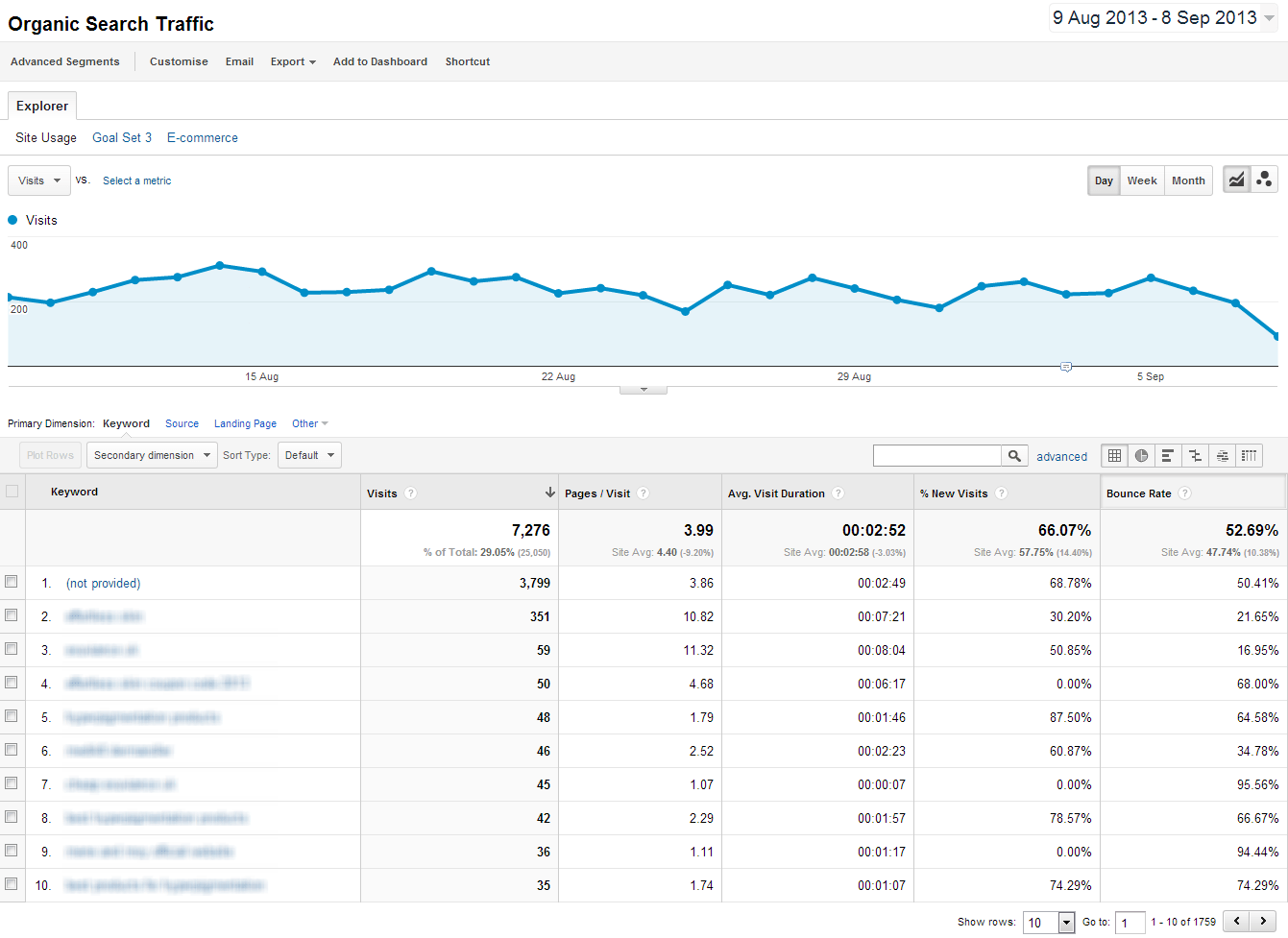
Google Analytics Organic Keywords Not Provided

Now that we will no longer see organic keyword data in Google Analytics, the Search Queries Report has become one of the only ways we can ascertain organic search terms for analysis.

Although the data is only estimates and approximations, this is the only place you will see your Google organic search keywords at all, so it is worth embracing this report sooner rather than later.

When you review the report for keyword insight, remember to not just consider what keywords are there that are performing well but also which ones you would expect to see doing better. You can use this insight to ensure you spend time optimising the parts of your site that need it most.

The data has value on its own but is most useful when comparing different date ranges. Although there is no “compare dates” function as in Google Analytics, you can manually select and export the chart data for different date ranges and see how the performance of your keywords changes.

Track Rankings Without Breaking The Rules

Another use for this report is in that it provides approximate average positions for your keywords, something that Google’s policies state we should not be tracking in any other way.

Because you can easily select your desired date range, you can monitor ranking fluctuations month on month. You can then use this data to see which keywords are performing best and which are not ranking as well as you’d like.

What’s more, you can use the included filters to see how your average keyword rankings change with location, although this is currently limited to country level data only. Try setting different filters and seeing how the data changes and what you can learn from it.
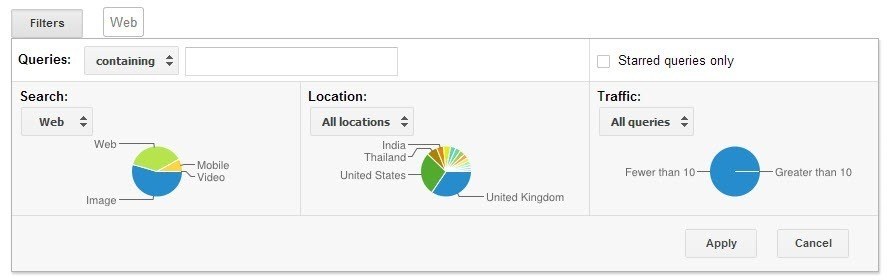
Search Query Report Filters in Google Webmaster Tools

It’s Not All About Keywords – Look At Top Landing Pages Too

While there’s no reason not to carry out your primary landing page analysis in Google Analytics, the “Top pages” section of the Search Queries Report does provide some additional value and again gives data you cannot get in Analytics.

Although the click data here is likely to be far less accurate than that in Google Analytics, this report does show you an approximate number of impressions, CTR and again the average position for that landing page in search results. This allows you to see how the page position affects CTR and shows where you might be able to make some good wins by developing pages with lots of impressions but a low average position.

For example, your top landing pages in Google Analytics may actually get fewer impressions than some other pages which struggle to rank on page one. Imagine if you could improve the ranking of that page with an average position of 11 that has five times as many impressions each month than your top performing landing page at position 2?

Limitations – Date Range And Accuracy

It is important to remember that this report is not as accurate as anything you would see in Google Analytics and is intended as an overview to help you understand how your site is performing in actual search queries, rather than from visitors as you would see in Google Analytics.

The numbers you see are very much approximations and should be used as such. That said, these are produced by Google based on actual search activity and so do give a good idea of what search terms are working well and those which are not.

In addition, you can currently only see data for the last 90 days although this is likely to increase in the coming months, as reported in this post from Search Engine Land. With the promise of a 12 month date range coming in the near future, this report could become even more useful.

Get In Touch

If you haven’t used this old report in a while I strongly recommend you dive back in and see what new information and insight you can gather. Be sure to play around with the filters and date ranges to see what you can learn. Let me know your experience and feedback in the comments section below.

Image Source

Data Concept via BigStock

Responses

  1. Scott Nash avatar

    Thank you for taking the time to write this article. Since Google has taken our ability away to see our organic keyword information things have been a bit of a challenge. we don’t use adwords but have access to our our keysowrd via our account.

    My question is this; Should we create blog post containing our low impression key word to try and build on those or stick to our high impression key words?

    Our blog is bringing some traffic to our website but it could be better.

    Have a great day .

    1. Emma North avatar

      Hi Scott. You can definitely tailor blog content around niche keywords and this is a good way to provide users with more content for more searches.

      Your main high-impression keywords are more likely to go to main pages such as service or product pages, so using blog posts to target niche variations or keywords you wouldn’t normally target on-page is a good technique to capture more traffic.

      I hope this helps!

  2. Armen avatar
    Armen

    Emma, Great Post! Question though why are the results in Google Analytics -> Acquisition – > Search Engine Optimization reports different than the results in Webmaster Tools Report?

    Aren’t the two connected?

    1. Emma North avatar

      Hi Armen. Yes the two are connected to a degree but the data is filtered by Google in different ways. In either case, both are only approximations.

      If you change Webmaster Tools settings to all queries and all types of search as well as the same date ranges you will see much similar results to the default settings, but still not identical.

      I hope this helps and thanks for your feedback.

  3. Peter Kirwan avatar
    Peter Kirwan

    Good post Emma. Will definitely be using Webmaster Tools more going forward!

    1. Emma North avatar

      Thanks Peter, glad you found it useful.

  4. Thad James avatar

    Emma, thanks for the refresher on Google Webmaster Tools. Every time I think I know enough, I realize that I forgot something. Great tips!

    1. Emma North avatar

      No worries Thad, thanks for the feedback! This report is one of those ones we all know about but stop noticing after it being fairly useless for so long; but now is a good time to rediscover it!

Leave a Reply

Your email address will not be published. Required fields are marked *

Sophie Roberts

Managing Director

Sophie Roberts is Managing Director and owner of Koozai, one of the UK’s longest-established digital marketing agencies. Having joined the business in 2016, she became Managing Director in February 2018 before leading a successful management buyout in 2021. With more than 30 years of marketing experience, Sophie specialises in AI Search, Digital PR, marketing strategy, agency leadership and helping businesses adapt to the changing search landscape. She works closely with clients and Koozai’s specialist teams to develop commercially focused digital strategies that improve visibility, strengthen brand authority and deliver measurable business growth. Over the course of her career, Sophie has worked with more than 200 organisations, ranging from ambitious SMEs to household brands including Golden Wonder, Airfix & Humbrol and Victorinox Swiss Army Knives. Since joining Koozai she has helped shape digital strategies for clients including Travelbag, Trevor Sorbie, Red Funnel and Côte Brasserie, building long-term partnerships that often span many years. Although clients often approach Koozai for Technical SEO, PPC, Digital PR or AI Search support, Sophie’s approach has always been to understand the wider business challenge rather than simply deliver a marketing service. She believes the best client relationships come from treating every client’s business as if it were your own, combining commercial thinking with honest advice and a genuine investment in long-term success. Sophie’s career began in public relations, where she led award-winning campaigns before moving into digital marketing. One of her earliest successes was the BBC’s Service! campaign, which won the Catey Award for Best Independent Marketing Campaign and helped raise the profile of front-of-house hospitality careers across the UK. Since then, she has developed marketing strategies for organisations across hospitality, construction, travel, tourism, healthcare, education, retail, ecommerce, finance, automotive and manufacturing, giving her broad commercial experience across both B2B and B2C sectors. More recently, Sophie has become one of Koozai’s leading voices on AI Search and the impact of generative AI on marketing. She has developed the agency’s AI prompt library, built custom GPTs and AI agents to improve internal efficiency, and created Koozai’s AI usage policy to help the business adopt AI responsibly and effectively. She is particularly interested in how AI is changing the way people discover brands, products and services, and what businesses need to do to remain visible as search continues to change. Sophie regularly writes about AI Search, Digital PR, organic growth, marketing strategy, leadership and the practical application of AI in marketing. She also reviews and fact-checks Koozai’s AI Search and digital strategy content before publication, ensuring it is accurate, practical and reflects current best practice. Alongside her agency work, Sophie has delivered webinars on SEO for the construction industry, spoken at digital marketing events across Hampshire, featured in Search With Sean Live and supported the hospitality industry through judging and organising prestigious awards, including the UK Sommelier of the Year and UK Restaurant Manager of the Year. She also served on the organising committee for the National Restaurateurs Dinner. Her work has been recognised through both personal and agency awards, including the Catey Award for Best Independent Marketing Campaign and the Construction Marketing Award for Best Small Agency. Sophie holds a BA (Hons) in Marketing & PR together with Google and HubSpot marketing certifications. She continues to explore how emerging technologies can improve marketing effectiveness while keeping people, creativity and commercial thinking at the heart of every strategy. Her insights and commentary have been featured by publications including Moz, Sitebulb, Yahoo News, The Business Magazine, Hampshire Business News, Portsmouth News, The Daily Echo, Professional Electrician, The Caterer, Restaurant Online, HVP Magazine and many other industry publications. Away from work, Sophie is a self-confessed foodie, proud geek and lifelong learner who believes every day should be a school day. She is passionate about creating positive workplace cultures, supporting work-life balance and helping people build careers they genuinely enjoy.

Sophie Roberts Read more about Sophie Roberts
aspect-ratio
Sophie Roberts

Making the Application Easy: What People Need at the Final Step

Sophie Roberts
@hospitalitysoph
6th Aug 2026
AI
aspect-ratio
Sophie Roberts

Why AI Recommends Some Financial Brands and Not Others

Sophie Roberts
@hospitalitysoph
5th Aug 2026
AI
aspect-ratio
Sophie Roberts

How Does AI Choose Which Brands to Recommend?

Sophie Roberts
@hospitalitysoph

AI
aspect-ratio
Sophie Roberts

What Makes a Website AI Search Ready?

Sophie Roberts
@hospitalitysoph
4th Aug 2026
AI

Digital Ideas Monthly

Sign up now and get our free monthly email. It’s filled with our favourite pieces of the news from the industry, SEO, PPC, Social Media and more. And, don’t forget – it’s free, so why haven’t you signed up already?